Tips For Users - Basics |
| SMARTMAN SKILLS MENU |
The SKILLS MENU is where you will decide which activity you will perform. The key points to keep in mind are as follows:
-
The SKILLS MENU is not available unless you have calibrated SmartMan. They will be grayed out if they are not available.
-
Each person who registers is allowed to perform 3 practices of each skill and 3 tests.
-
Once you click on a button to select a practice or a test, you go to a page which explains that activity. You must press the SPACE BAR to cue the computer. The practice or test will NOT start until you perform the first skill
-
Once a test has started the computer will record until either you have completed that practice or test or until the time allotted expires.
-
All data for the completed test will be stored, regardless of whether you stop partway through or not.
-
To cancel a practice or a test, press the ESC key before the test has been completed.
-
Once you are registered, you can come back to do another practice or test or to review previous results. Login under the same name to do this.
From the SmartMan main menu, the left hand side provides access to practice and test area. Click on one of the red bars to select which aspect of CPR you wish to test. Below is a description of each activity.
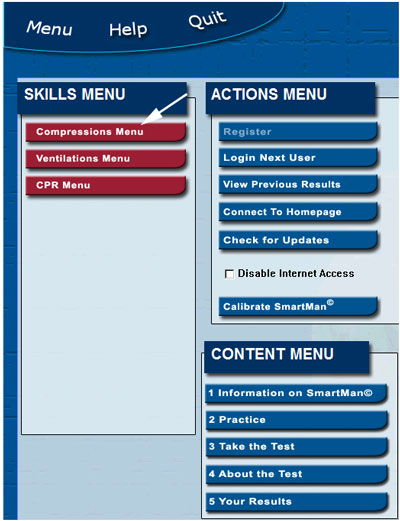
SMARTMAN COMPRESSIONS MENU
When you click on the Compressions Menu, you will see the following screen:
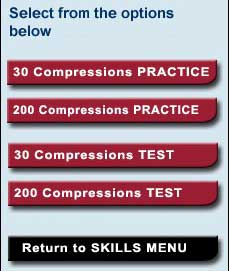
You can select from 4 options.
30 Compressions PRACTICE. This allows you to perform 2 sets of 30 compressions. Click on the button. The next screen provides you with more information. Press the space bar to cue the computer. The computer will start recording when you perform the first chest compression. You perform 30 compressions, then wait for 4 seconds as if a person were perform ventilations and then you perform 30 more compressions. At the end of the set, you can review your results.
200 Compressions PRACTICE. This allows you to perform 200 straight compressions. Click on the button. The next screen provides you with more information. Press the space bar to cue the computer. The computer will start recording when you perform the first chest compression.
30 Compressions TEST This allows you to perform 5 sets of 30 compressions. Click on the button. The next screen provides you with more information. Press the space bar to cue the computer. The computer will start recording when you perform the first chest compression. After each set of 30 compressions, wait for 4 seconds as if a person was performing ventilations. Then perform your next set of 30 compressions. At the end of the fifth set of compressions, the computer will attempt to send your results to an internet server. You can then review and print your results.
200 Compressions TEST This allows you to perform 200 straight compressions. Click on the button. The next screen provides you with more information. Press the space bar to cue the computer. The computer will start recording when you perform the first chest compression. At the end of the set the computer will attempt to send your results to an internet server, you can review your results.
Press the black bar to return to the Main Menu.
SMARTMAN VENTILATIONS MENU
Click on a button to select which skill you wish to perform. Click on the black button at the bottom to return to the Main Menu.
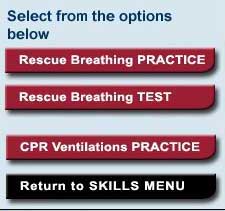
Rescuer Breathing PRACTICE. This allows you to practice 1 minute of rescue breathing. Click on the button. The next screen provides you with more information. Press the space bar to cue the computer. The computer will start recording when you perform the first chest compression. At the end of the set the computer will attempt to send your results to an internet server, you can review your results.
Rescue Breathing TEST. This allows you to practice 1 minute of rescue breathing. Click on the button. The next screen provides you with more information. Press the space bar to cue the computer. The computer will start recording when you perform the first chest compression. At the end of the set the computer will attempt to send your results to an internet server, you can review your results.
CPR Ventilations PRACTICE. During CPR you are to provide 2 breaths to the victim between the compressions. It is difficult to perform the inspiration slowly (1 second for the inspiration), release and then immediately perform a second one. Because this is not an easy skill, we provide this special practice. You practice to perform these 2 breaths. The practice runs for 20 seconds so that you can get a feel for the correct way to perform this skill. In CPR you would NEVER perform this many of these compressions.
SMARTMAN CPR MENU
Click on a button to select which skill you wish to perform. Click on the black button at the bottom to return to the Main Menu.
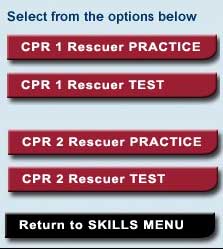
CPR 1 Rescuer PRACTICE. This allows you to perform a complete set of 5 times 30:2. You begin with the 30 compressions, then give 2 ventilations, and repeat this 5 times. At the end of the fifth set of compressions, the computer will record your data so you can hen review and print your results.
CPR 1 Rescuer TEST. This allows you to perform a complete set of 5 times 30:2. You begin with the 30 compressions, then give 2 ventilations, and repeat this 5 times. At the end of the fifth set of compressions, the computer will attempt to send your results to an internet server. You can then review and print your results.
CPR 2 Rescuer PRACTICE. This is designed to allow 2 or more people perform 2 complete sets of 5 times 30:2. One person will perform chest compressions and 1 person will perform the ventilations. In some instances a third person maintains the seal for the ventilations. You begin with the 30 compressions, then give 2 ventilations, and repeat this 5 times. At the end of the fifth set of compressions, switch so that the person performing compressions will perform the ventilations. The person performing the ventilations will now perform compressions.
The computer will record these two completes sets of information. At the end it record your data so you can then review and print your results.
CPR 2 Rescuer TEST. This is designed to allow 2 or more people perform 2 complete sets of 5 times 30:2. One person will perform chest compressions and 1 person will perform the ventilations. In some instances a third person maintains the seal for the ventilations. You begin with the 30 compressions, then give 2 ventilations, and repeat this 5 times. At the end of the fifth set of compressions, switch so that the person performing compressions will perform the ventilations. The person performing the ventilations will now perform compressions.This allows you to perform a complete set of 5 times 30:2. You begin with the 30 compressions, then give 2 ventilations, and repeat this 5 times.
At the end of the fifth set of compressions, the computer will attempt to send your data to the server. You can then review and print your results.

|


